# Octarine 0.28.0 Changelog
Released: 2025-08-26
### Ask Octarine
- Ask Octarine now features two distinct modes:
- **Ask:**
- Works as before by allowing you to chat about your notes.
- Answers include explicit text from the referenced notes with wikilink references.
- **Create:**
- Helps you leverage your notes and Octarine to generate additional notes, draft emails, or create templates.
- Instead of providing a direct answer, responses offer actionable steps based on attached references.
- The Create mode has three possible outcomes:
- **Open in Email** – when the request is recognized as an email.
- **Create template** – when a reusable template is needed.
- **Create note** – for summaries, reviews, and more.
- The chat window design has been updated for a more recognizably chat-like experience:
- User messages now appear as bubbles on the right while responses retain their previous format.
- References and relevant notes are linked to the response rather than the query.
- The message box now includes a reference selector and date range selectors at the bottom. Instead of listing every reference, a button shows the label “+ x references”.
- Any selected folders or note references are moved to the top of the list.
- Additional improvements:
- Responses can now be retried.
- The copy actions have been moved out of a dropdown so that they are always visible.
### Writing Assistant
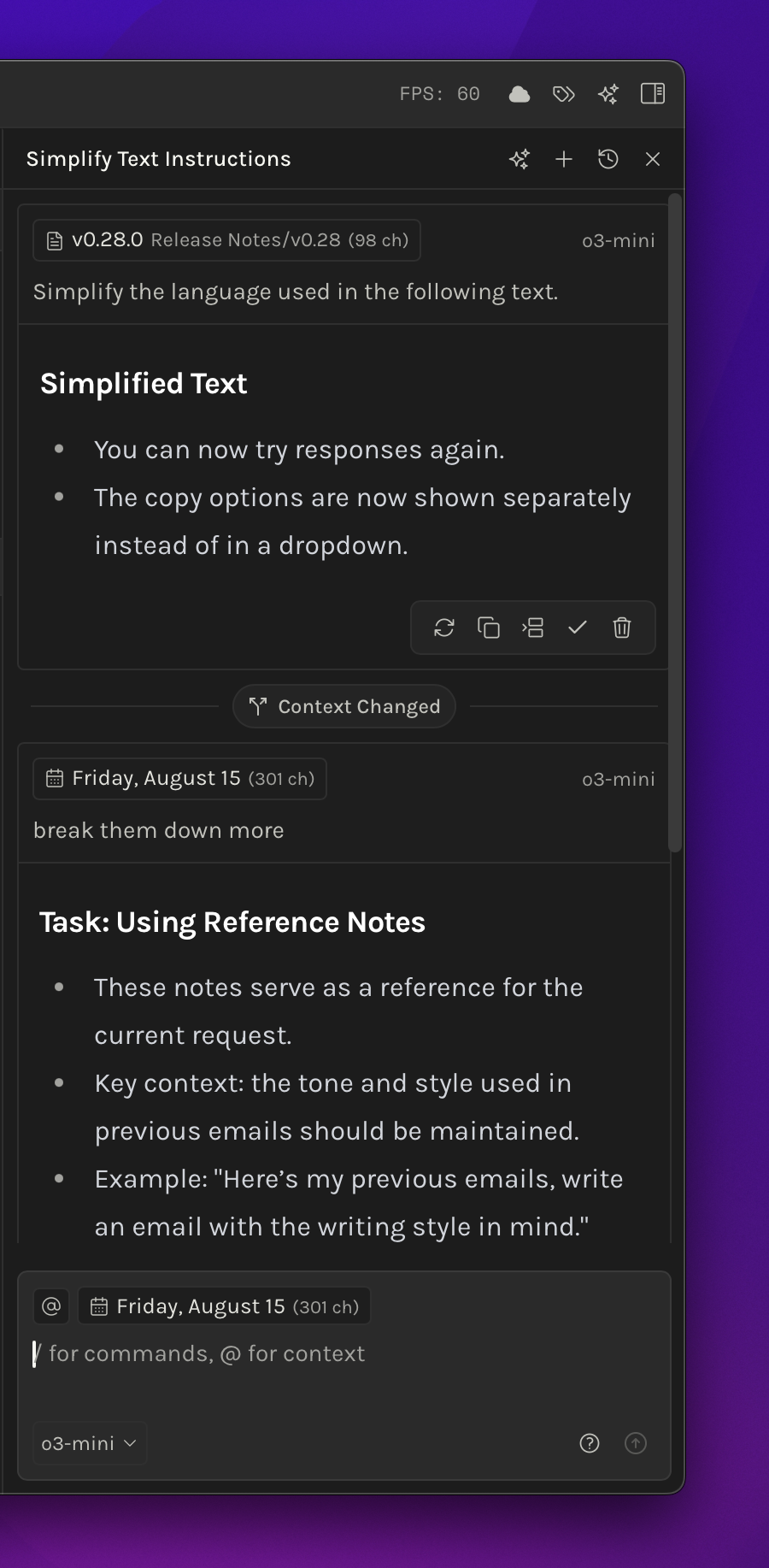
- The Writing Assistant now displays a "Context Changed" indicator when context selections or files change within the same chat. This ensures that any previous irrelevant responses are discarded to maintain accuracy.
- Quick actions for responses now include both `retry` and `delete`.
- Selected text now displays as "x ch" (where x is the number of characters) instead of the full "x characters".
- OpenAI API responses have been improved for a better user experience.
### Folder Customisation
- Folders can now be pinned to stay at the top.
- Each folder supports its own sorting method, independent of the workspace sorting method.
- Icons and colors can be assigned to folders for better categorization.
- All folder settings are stored in a `config.json` file located within the particular folder.
> Available only to Pro License users.
### Improvements
- Pinned notes and folders now appear in a separate view that spans across Notes, Daily Desk, and Templates. A pin toggle in the tree headers allows you to quickly switch between pinned items and your current view.
- Search performance has been enhanced for faster results.
- The `CMD/Ctrl + K` command bar features a refined design:
- Rows are smaller in height.
- Note navigation follows the same design used throughout the rest of the app.
- The "recently viewed" list is limited to 10 items, and now displays an icon instead of the text “recently viewed”.
- The quick action designs for both Writing Assistant and Ask Octarine have been updated for clarity.
### Fixes
- Resolved an issue where creating a new folder did not update its timestamp in the local database, which previously caused sorting issues until a refresh was done.
- Fixed a bug where auto title generation would fail for both Ask Octarine and Writing Assistant when using `Ollama`.
- Addressed a problem where clicking outside would not discard the rename operation initiated through the file tree context menu.
- Fixed an issue where Perplexity AI setup would fail.
### Changes
- The Graph feature has been relocated from the sidebar to the Global breadcrumb as an icon.
- Reduced the size of H1, H2 and H3 by 4px each.